
Setup and operation

Obelis
Power Connection
Follow these instructions to connect Obelis to a power source:
-
Using the Power Adapter (100-240V AC)
- If plugging into a household power outlet (100-240V AC, 50/60 Hz), use the supplied power adapter.
- Insert the adapter into the wall socket, then connect the transformer’s output to the Obelis compactor’s power port.
-
Direct 12V DC Connection
- If you have a 12V DC power source, you can connect Obelis directly using a compatible cable, without the adapter.
-
Safety Precautions
- Ensure the power supply voltage matches the device’s requirements (12V DC).
- Do not pull the cable to unplug the power adapter—always grip the plug directly.
- If the power adapter is damaged or the device shows electrical issues, stop using it and contact technical support (service@obelis.it).
- If the device will not be used for an extended period, unplug it from the power source to prevent unnecessary consumption and ensure safety.
Carefully follow these instructions to ensure the safe and proper use of Obelis.
Operation
Operation
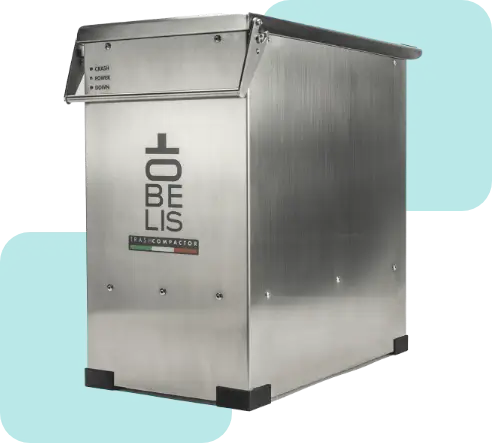
Obelis functions like a standard waste container, with the added benefit of compaction. Simply insert a polyethylene waste bag, and once full (holding approximately 18 liters of compacted waste, equivalent to 75 liters of regular volume), seal and remove it.
Place a plastic bag inside the compactor. Once filled, close the lid and lower the handle to automatically start the compression process. Lifting the handle resets the mechanism to its initial position. Repeat the process until the bag reaches its maximum capacity, compacting 75 liters of waste into just 18. Finally, remove and seal the bag.
Obelis works best with the following waste materials:
Dry, Non-Rigid Waste:
- Plastic bottles (caps removed)
- Tetra Pak containers (cap removed)
- Paper and cardboard
- Lightweight blister packs (e.g., medication packaging)
Slightly Moist Organic Waste:
- Wilted flowers
- Food scraps
- Bulky vegetables
Medium-Rigidity Waste (Insert with Caution):
- Aluminum drink cans
- Rigid plastic containers (e.g., detergent, cosmetics)
- Tin cans and food cans
- Semi-rigid plastic containers
Do Not Insert:
- Glass objects or non-deformable materials
- Waste containing liquids
Faq
Faq
Before starting compression, a plastic bag must always be placed inside the compactor. After compaction, to add more waste or remove the full bag, slightly lift the handle until you hear the first click (partial opening). This activates the automatic descent of the base, indicated by the Down LED lighting up. Once the descent is complete and the LED turns off, you can fully lift the handle and open the lid to continue filling or emptying the Trash Compactor.
If the compactor comes into contact with water, immediately disconnect it from the power supply and do not attempt to turn it back on. Exposure to liquids may compromise the safety of electrical and electronic components. In this case, contact technical support for an assessment and further instructions.
If the compactor doesn’t turn on or isn’t functioning properly, first check that it’s correctly connected to the power supply and that no objects are obstructing the mechanism. If the issue persists, do not attempt to repair it yourself—contact technical support for diagnostics and assistance.